
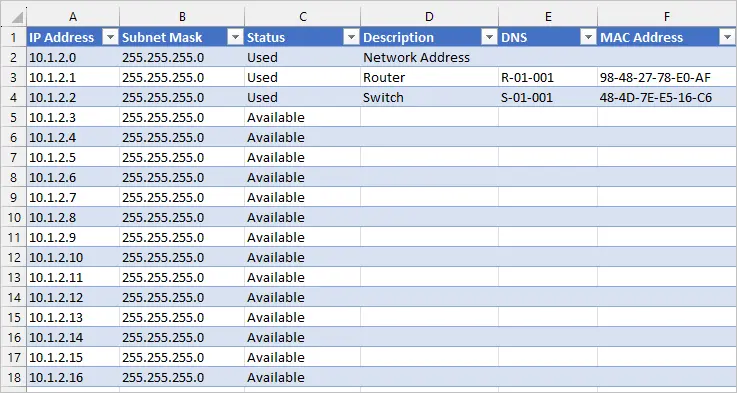
What is IP Address Management?
IP address management (IPAM) is a critical aspect of network operations that involves the planning, tracking, and management of IP addresses within a network. It ensures that IP addresses are allocated efficiently, reduces the risk of IP address conflicts, and simplifies network troubleshooting. Effective IP address management is essential for organizations of all sizes, as it helps to maintain network reliability, security, and scalability.
Benefits of IP Address Management
Implementing an IP address management system provides several benefits, including improved network performance, reduced downtime, and enhanced security. It also helps organizations to comply with regulatory requirements and industry standards. By automating IP address management tasks, organizations can free up IT resources for more strategic activities.
Key Features of IP Address Management Software
IP Address Tracking
A robust IP address management software should have the ability to track IP addresses across the network, including IPv4 and IPv6 addresses. It should also be able to track IP address assignments, subnets, and VLANs.
IP Address Allocation
The software should be able to allocate IP addresses automatically, based on predefined rules and policies. It should also support manual allocation and deallocation of IP addresses.
IP Address Conflict Detection
The software should be able to detect IP address conflicts in real-time, alerting administrators to potential issues before they become major problems.
Installation Guide
Step 1: Plan Your IP Address Management Strategy
Before installing an IP address management software, it’s essential to plan your IP address management strategy. This includes defining your IP address space, identifying your network infrastructure, and determining your IP address management requirements.
Step 2: Choose the Right IP Address Management Software
Choose an IP address management software that meets your organization’s needs. Consider factors such as scalability, ease of use, and compatibility with your existing network infrastructure.
Step 3: Install and Configure the Software
Install and configure the IP address management software according to the manufacturer’s instructions. This may involve setting up the software on a server, configuring network settings, and integrating with existing network management systems.
Technical Specifications
System Requirements
| Component | Requirement |
|---|---|
| Operating System | Windows Server 2012 or later, Linux |
| Processor | Quad-core processor or better |
| Memory | 8 GB RAM or more |
| Storage | 500 GB or more of free disk space |
Pros and Cons of IP Address Management
Pros
- Improved network performance and reliability
- Reduced downtime and improved uptime
- Enhanced security and compliance
- Automated IP address management tasks
Cons
- Initial investment in software and training
- Complexity of setup and configuration
- Dependence on software for IP address management
FAQ
What is the difference between IPv4 and IPv6?
IPv4 and IPv6 are two different versions of the Internet Protocol. IPv4 uses 32-bit addresses, while IPv6 uses 128-bit addresses. IPv6 provides a much larger address space than IPv4, making it more suitable for large and complex networks.
Can I use IP address management software with my existing network infrastructure?
Yes, most IP address management software is designed to work with existing network infrastructure, including routers, switches, and firewalls. However, it’s essential to check compatibility before purchasing the software.